When tasks move through different stages without a clear structure, it becomes difficult to see what is progressing and what is getting delayed. Work starts to feel scattered, priorities shift often, and important updates get lost in the process. A kanban board brings clarity to this situation by showing every task in a simple visual flow, helping you understand what needs attention and what is already moving forward.
This guide explains how a kanban board works, the elements of a kanban board, and when to use it for project work. You will also see practical kanban board examples, understand the difference between scrum board vs kanban board, and learn simple practices that help you keep work organized, visible, and easy to move forward.
What is a Kanban Board?
A kanban board is a project management tool used to organize tasks into stages such as To Do, In Progress, and Done. It helps you see how work moves across steps, making it easier to track progress, identify delays, and keep tasks moving in an orderly flow.
The Kanban board works by arranging tasks in the form of cards in different work stages. As tasks move forward, the cards shift from one column to the next. This simple structure makes it easy to understand what teams are currently working on, what is waiting, and what they have already completed. A kanban board for project management helps you keep work visible so you do not overlook anything.
The idea behind a kanban board did not begin with modern project tools. Its origin is in the late 1940s when Toyota engineer Taiichi Ohno invented the Kanban system as a way of improving the Toyota Production System. The approach used visual cards to signal when factories needed new parts in production, helping them produce items based on real demand rather than guesswork.
What Are the Key Elements of a Kanban Board?
To understand how a kanban board works, first look at the components that make up the board. Each component plays a specific role in keeping your workflow organized and moving. Here are the components of a kanban board:
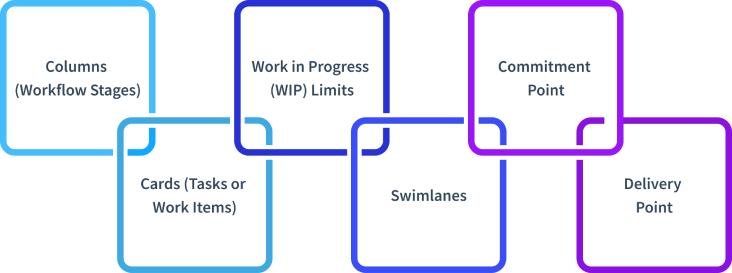
- Columns (Workflow Stages): Columns represent the different stages of work. Most boards begin with stages such as To Do, In Progress, and Done, but the stages can change depending on how your work flows. These columns indicate the current status of each task.
- Cards (Tasks or Work Items): Cards represent individual tasks. Each card usually contains a short description of the work, relevant details, and sometimes a due date. As work progresses, the card moves from one column to the next.
- Work in Progress (WIP) Limits: Work in Progress limits set a maximum number of tasks that can stay in one column at a time. This prevents teams from handling too many tasks at once. On reaching the limit, new tasks wait until existing ones move forward. This approach keeps work focused and helps tasks move through the board more smoothly.
- Swimlanes: Swimlanes are horizontal rows that run across the board, used to separate work by team, priority, project type, or any other category that matters to you. They keep a busy board readable and make it easier to filter what is relevant to a specific person or group.
- Commitment Point: The commitment point marks the stage where a task officially enters the workflow. At this stage, the task becomes an active item that needs to move through the process until completion.
- Delivery Point: The last stage of work completion is the delivery point. Once the card gets here, the task is complete with its workflow.
What Are the Different Types of Kanban Boards?
Not every kanban board looks or works the same. Depending on where you are working, what you are tracking, and how your team operates, the type of board you use can make a real difference. Here are the main types you should know.
1. Physical Kanban Board
A physical kanban board uses a whiteboard, wall, or board where team members write tasks on sticky notes or cards. Teams usually label columns with stages such as To Do, In Progress, and Done. Team members then move the notes to another column as work progresses. This setup works best when all participants work in the same location and can easily see the board.
2. Digital Kanban Board
A digital kanban board runs through software or online tools. Tasks appear as digital cards that you can move across columns with a click or drag. This kind of board allows you to include information like due dates, attachments, and comments to specific tasks. Digital boards come in handy where work occurs in various places since everyone can notice updates in real-time.
3. Personal Kanban Board
A personal kanban board helps you organize individual tasks and daily work. It usually contains simple stages like To Do, Doing, and Done. This type of board helps you manage personal priorities, track progress on tasks, and keep daily work structured without becoming overwhelming.
4. Team Kanban Board
A team kanban board helps coordinate tasks across multiple people working on the same project or workflow. Each task card shows the work that needs completion and moves through shared stages on the board. This setup keeps work visible for everyone involved and helps ensure tasks move forward without confusion.
What are the Examples of Kanban Boards?
There is a wide variety of applications of a kanban board, and it depends on the kind of work you want to organize. The structure remains simple, but the stages and task cards change based on the workflow. Looking at a few kanban board examples helps you understand how the board adapts to different types of work.

1. Software Development Kanban Board
A development team uses a kanban board to track features, bug fixes, and releases. Columns typically include "Backlog," "In Development," "Code Review," "Testing," and "Deployed." The cards contain particular tasks, the developer allocated to them, and any notes. With this arrangement, it is easy to know where a feature is in the pipeline and whether something blocks it before it goes to production.
2. Marketing Task Kanban Board
A marketing team has to deal with various campaigns, content, and deadlines simultaneously. A Kanban board is useful as it helps to divide the work into steps, such as “Ideas”, “In Progress”, “Review”, and “Published”. Each content piece gets its own card, so everyone knows what is live, what is under review, and what is still in progress.
3. Human Resources Kanban Board
HR teams have plenty of tasks to perform, like hiring, onboarding, training, and employee requests. A Kanban board is a perfect tool to keep all of these activities structured. For recruitment only, the columns such as “Applications received”, “Screening”, “Interview scheduled”, “Offer sent”, and “Hired” provide a visual flow of the entire hiring process that is simple to maintain and update.
4. E-commerce and Order Management
An e-commerce team can use a kanban board to track orders from placement to delivery. Columns like "Order Received," "Processing," "Packed," "Shipped," and "Delivered" make the entire fulfilment process transparent. It is especially useful when work moves through different stages, and everyone needs to stay in sync.
5. Personal Productivity Kanban Board
A personal board assists in the organization of day-to-day work and essentials. The stages are usually simple, such as To Do, Doing, and Done. This format keeps your tasks visible and helps you focus on completing one step at a time.
6. Customer Support Kanban Board
A support workflow often uses stages such as New Requests, In Review, In Progress, and Resolved. Each card represents a support ticket or request. The kind of board will assist you in monitoring issues effectively and keep each request progressing towards a solution.
How Does a Kanban Board Work?
A kanban board works by showing tasks as cards and organizing them into columns that represent different stages of work. Each card represents a task that needs completion. At the beginning, tasks usually sit in the first column, often labelled To Do. Once work begins, the card moves to the next stage, such as In Progress. This simple movement across columns makes it easy to see the current status of every task.
As work continues, cards move step by step through the workflow until they reach the final stage, usually marked as Done. This movement shows how tasks progress from start to completion. A quick look at the board helps you understand what the team is currently working on, what is waiting in line, and what the team has already finished.
Some boards also use limits to control how many tasks can stay in one stage at the same time. This prevents the handling of too many tasks at a time and keeps the work running smoothly. When tasks move steadily across the board, the entire process becomes easier to track and manage.
What are the Benefits of Kanban Board?
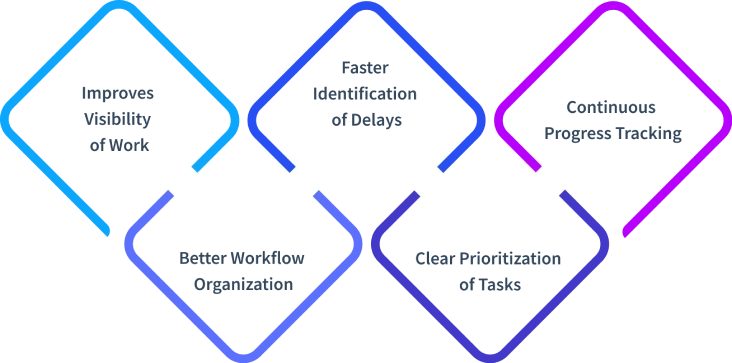
A kanban board helps you structure tasks clearly, so you always know what needs attention and what is already progressing. This clarity makes it easier to stay focused and keep work moving smoothly. Here are some key benefits of kanban board systems and how they support better workflow management.
1. Improves Visibility of Work
A kanban board shows every task in a visual format, making it easier to understand the current status of work. Rather than scrolling through messages or notes, you can just take a glance at the board and know what is pending, what is in progress, and what your team has completed. This clear view helps you stay aware of how work is moving at all times.
2. Better Workflow Organization
Tasks move across clearly defined stages on the board, which keeps the workflow structured. Each stage represents a step in the process, so it becomes easier to understand where a task stands and what needs to happen next. Work follows a clear path from start to completion without unnecessary confusion.
3. Faster Identification of Delays
Tasks that remain in one stage for too long become immediately visible on the board. This helps to identify where the work is slacking and where it is necessary to focus. High exposure to such delays early on assists in maintaining the workflow steady and stops minor problems from developing into bigger ones.
4. Clear Prioritization of Tasks
A kanban board allows you to arrange tasks based on urgency and importance. High-priority work can stay visible at the top while less urgent tasks remain in the queue. The focus will shift to work that is most important, which will assist you in concentrating on doing the right work at the right time.
5. Continuous Progress Tracking
The movement of cards across the board shows how work progresses step by step. As tasks move to completion, the cards move to the Done column, while ongoing tasks remain in earlier stages like To Do or In Progress. This simple view helps you quickly understand the work progress without needing frequent updates or lengthy status discussions.
What are the Challenges to creating a Kanban Board?
A kanban board is easy to understand, but creating one that actually supports your workflow requires some planning. If the structure is not clear, tasks may pile up, and the board may stop reflecting the real progress of work. Here are some common challenges you may face when creating a Kanban board.
1. Defining the Right Workflow Stages
Choosing the right columns for your board can sometimes be difficult. If the stages are too broad, it becomes hard to understand what is actually happening in that step. At the same time, adding too many stages can make the board harder to read and manage. A balanced workflow structure helps tasks move clearly from start to completion.
2. Managing Too Many Tasks at Once
When too many tasks enter the board at the same time, the workflow can quickly become overloaded. Less urgent tasks can bury important ones, making it harder to focus on what should move forward first. Keeping only a manageable number of active tasks on the board helps maintain focus and allows work to progress steadily.
3. Keeping the Board Updated
A kanban board works best when it reflects the current state of work. When you do not move task cards regularly, the board may stop showing the actual progress. Regular updates keep the board accurate and make it easier to rely on it for daily work tracking.
4. Ignoring WIP Limits
Work in Progress (WIP) limits how many tasks can stay in a stage at the same time. When teams ignore these limits, too many tasks gather in one column, and the workflow begins to slow down. You may start switching between multiple tasks, which reduces focus. Setting and following WIP limits helps keep work balanced and allows tasks to move forward steadily.
5. Resistance from the Team
You can create a well-structured kanban board, but it may not work if your team does not actively use it. Sometimes your team may feel uncomfortable because the board makes tasks and progress more visible. To make your team more comfortable using and accepting the board, it is helpful to explain that the board is there to structure work and enhance the workflow.
How Does a Kanban Board Differ from a Scrum Board?
Both Kanban and Scrum are popular forms of organizing and managing work, yet each of them follows different approaches. One focuses on continuous workflow, while the other works through structured time cycles. Understanding these differences helps you choose the method that fits your workflow better. The table below explains the key differences between a scrum board vs kanban board in a clear and simple way.
| Kanban Board | Scrum Board |
|---|---|
| Tasks move continuously across workflow stages as work progresses. | Work progresses in fixed time cycles called sprints. |
| New tasks can enter the workflow whenever capacity is available. | The team defines and selects tasks at the start of each sprint. |
| Tasks move forward as soon as they reach the next stage. | The team completes tasks within the sprint duration. |
| Work in Progress limits the control over how many tasks stay active at a time. | Sprint planning determines the number of tasks for the sprint. |
| Focus stays on maintaining a steady flow of work. | Focus stays on completing the planned sprint tasks. |
| Tasks move individually through workflow stages. | The sprint structure guides task progress. |
Conclusion
A kanban board gives you a simple way to see how work moves from start to completion. When tasks stay visible and organized, it becomes easier to track progress, manage priorities, and keep work moving steadily. Understanding its elements, types, examples, benefits, and challenges helps you set up a board that fits your workflow. With the right structure and consistent use, you can keep tasks clear, focused, and easier to manage every day.

Run Projects With Less Chaos
Track tasks, timelines, and team capacity in one place.
Explore Project Management →